RAID 5
Protect critical data with efficient redundant storage
- Recover data after a storage device failure
- Increase usable storage capacity compared to RAID 1
- Support all emFile storage media
Overview
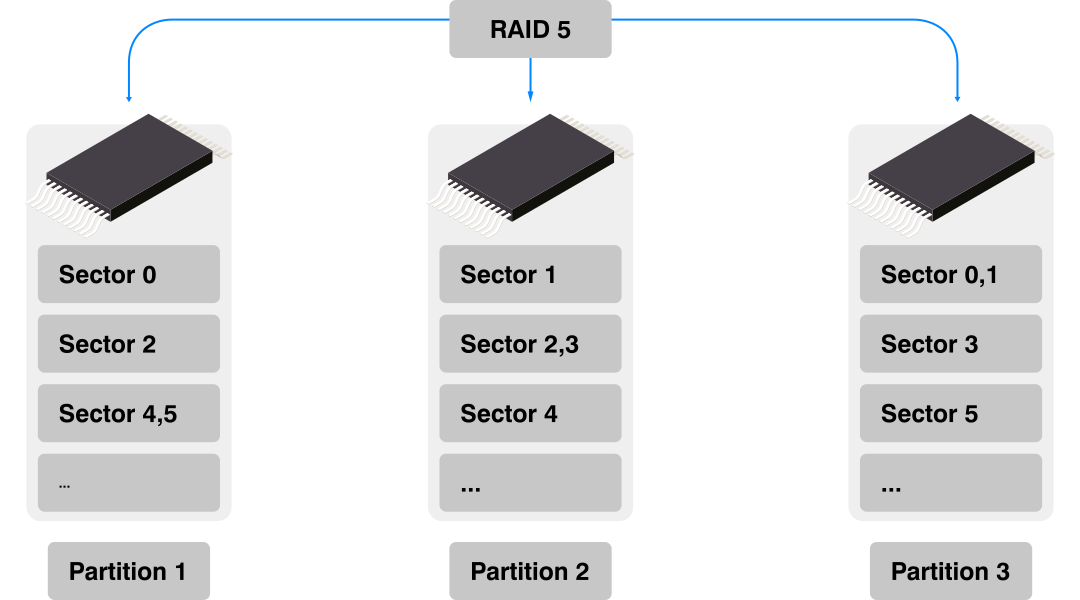
The emFile RAID 5 add-on provides data redundancy while offering more usable storage capacity than RAID 1. It distributes data and parity information across three or more partitions, typically located on separate storage devices.
If one partition or storage device fails, the missing data can be reconstructed from the remaining data and parity information. RAID 5 can therefore tolerate the failure of one partition without losing the data stored in the RAID volume.
RAID 5 works with both FAT and EFS and can be used with all storage media supported by emFile, including flash memory with an FTL as well as SD cards. The usable capacity depends on the number and size of the partitions, with the equivalent of one partition used for redundancy. Alternatively, multiple RAID partitions can reside on the same storage device.
Key features
- Increases usable storage capacity versus RAID 1
- Provides protection from storage device defects/failures
- Works on the storage layer with both FAT and EFS file systems
- Can be used with any storage device supported by emFile (such as NAND, NOR, and SD cards)
- Can use different storage types for partitions
- Can locate all partitions on the same storage device

RAID 5 versus RAID 1
RAID 1 mirrors all data on a second partition, providing straightforward redundancy but using 50% of the total storage capacity for the mirror. RAID 5 distributes parity information across all partitions instead.
This reduces the storage overhead as the number of partitions increases while still allowing recovery from the failure of one partition.
RAID with SEGGER’s NAND driver
SEGGER’s in-house, proprietary, Flash Translation Layer for NAND Flash is best-in-class in terms of speed, efficiency, reliability, and data protection. The driver has been carefully optimized to use as little RAM and ROM as possible while maintaining high performance. It can correct single and multiple bit errors using either the hardware ECC (error-correcting code) build into NAND flash or software ECC routines provided by the emLib ECC library. The NAND drivers utilize active and passive wear leveling, bad-block management, and are fail-safe. The RAID add-on provides an extra level of precaution to an already robust system. RAID maximizes data integrity and reliability.
SEGGER’s NAND Driver and RAID together would work to avoid a data loss when an uncorrectable bit error occurs during a read operation. In case of an uncorrectable bit error the Universal NAND driver requests the RAID 5 add-on to provide corrected sector data from the other partitions. This procedure applies to read requests coming from the file system as well as for read operations performed internally by the Universal NAND driver when the data of a NAND block is copied to another location.
Sector Data Synchronization
An unexpected reset that interrupts a write operation may cause data inconsistency. It is possible that only the data of the last written sector is updated on the storage device while the parity information is not. After restart, the file system will continue to operate correctly but in the case of a read error affecting either this sector or any sector in the same stripe the RAID5 component will not be able to recover the data that in turn may cause a data corruption. This situation can be prevented by performing a synchronization of all the sectors on the RAID5 volume. The application can perform the synchronization operation by calling the FS_STORAGE_SyncSectors() API function. This operation can be executed either at the file system initialization or in parallel with the normal file system activities, for example in a low priority task.
Sample configuration
The following code snippet shows how to configure a the RAID 5 add-on that uses three partitions located on the same NAND flash device.
/*********************************************************************
*
*       Defines, configurable
*
**********************************************************************
*/
#define ALLOC_SIZE      0x8000              // Size of the memory pool in bytes

/*********************************************************************
*
*       Static data
*
**********************************************************************
*/
static U32 _aMemBlock[ALLOC_SIZE / 4];      // Memory pool used for
                                            // semi-dynamic allocation.
/*********************************************************************
*
*       FS_X_AddDevices
*
*  Function description
*    This function is called by the FS during FS_Init().
*    It is supposed to add all devices, using primarily FS_AddDevice().
*
*  Note
*    (1) Other API functions may NOT be called, since this function is called
*        during initialization. The devices are not yet ready at this point.
*/
void FS_X_AddDevices(void) {
  //
  // Give the file system some memory to work with.
  //
  FS_AssignMemory(&_aMemBlock[0], sizeof(_aMemBlock));
  //
  // Add and configure the RAID5 volume. Volume name: "raid5:0:"
  //
  FS_AddDevice(&FS_RAID5_Driver);
  FS_RAID5_AddDevice(0, &FS_NAND_UNI_Driver, 0, 0);
  FS_RAID5_AddDevice(0, &FS_NAND_UNI_Driver, 0, 1000);
  FS_RAID5_AddDevice(0, &FS_NAND_UNI_Driver, 0, 2000));
  FS_RAID5_SetNumSectors(0, 1000);
  //
  // Add and configure the driver NAND driver. Volume name: "nand:0:"
  //
  FS_AddDevice(&FS_NAND_UNI_Driver);
  FS_NAND_UNI_SetPhyType(0, &FS_NAND_PHY_ONFI);
  FS_NAND_UNI_SetECCHook(0, &FS_NAND_ECC_HW_NULL);
  FS_NAND_UNI_SetBlockRange(0, 0, NAND_NUM_BLOCKS);
  FS_NAND_ONFI_SetHWType(0, &FS_NAND_HW_K66_SEGGER_emPower);
}